慧新维 · 产业链图谱 HuiXinWei · Supply Chain Graph
一个事件发生了,它会影响哪些公司的哪块业务?
我们把答案画成一张会动的图。
When an event happens, which companies' businesses are exposed?
We turn the answer into a living graph.
从一家公司出发,看它的业务落在哪些产业环节、受哪些因素推动;输入一句话描述的事件,图谱自动定位受影响的节点,并附上可回查的原文依据。本页全部截图来自真实可运行的工作台,不是设计稿。 Start from one company and see which industry nodes its businesses sit on, and what drives them. Describe an event in one sentence, and the graph locates affected nodes automatically — each with traceable source citations. Every screenshot on this page is from the actual running workbench, not a mockup.
以上为本演示预设的数据规模,仅供参考。实际系统可对接任意信息源——微信公众号、微博、X(Twitter)、新闻网站、研报库等,不限于当前已覆盖的数据源与 API 接口。 The figures above reflect this demo's preset data scope, for reference only. The real system can connect to any information source — WeChat official accounts, Weibo, X (Twitter), news sites, research report libraries, and more — not limited to the data sources and APIs currently covered.
传统产业链数据能查"谁在这个环节",但看不出"事件发生后,业务结构会怎么变" Traditional data tells you "who is in this segment" — not "how exposure changes when something happens"
研究员每天要回答"这个政策/价格/供给变化会影响谁",但传统方式是人工翻表格、凭经验拍脑袋,既慢又难复核。慧新维产业链图谱把这条推理过程结构化:公司 → 业务单元 → 产业环节 → 推动因素,事件一进来,顺着这条链路自动展开,影响大小一目了然,而且每一步都能回查原文。 Analysts answer "who's exposed to this policy/price/supply shift" every day — usually by manually scanning spreadsheets and relying on gut feel. Slow, and hard to audit. HuiXinWei structures that reasoning chain: Company → Business Unit → Industry Node → Driver Factor. Feed in an event, and it propagates automatically along this chain — with every step traceable back to source text.
搜一家公司,看它的业务暴露在哪 Search a company, see its exposure
输入公司名称或股票代码,立刻定位它的全部业务单元分别挂靠在哪些产业环节上。左侧行业树显示 2,064 个产业环节的完整层级,支持中文 / 英文 / 别名搜索,六大市场(中、港、美、日、韩、台)全覆盖。 Type a company name or ticker and instantly locate every business unit's position in the industry tree. The left panel shows the full hierarchy of 2,064 industry nodes, searchable in Chinese/English/aliases, covering six markets (CN, HK, US, JP, KR, TW).
- ✓模糊搜索,支持繁体名用简体搜Fuzzy search; traditional Chinese names searchable via simplified
- ✓每家公司的业务单元自动挂靶到对应产业环节Business units auto-mapped to industry nodes
- ✓股票代码一键查看 K 线One click to view price chart by ticker
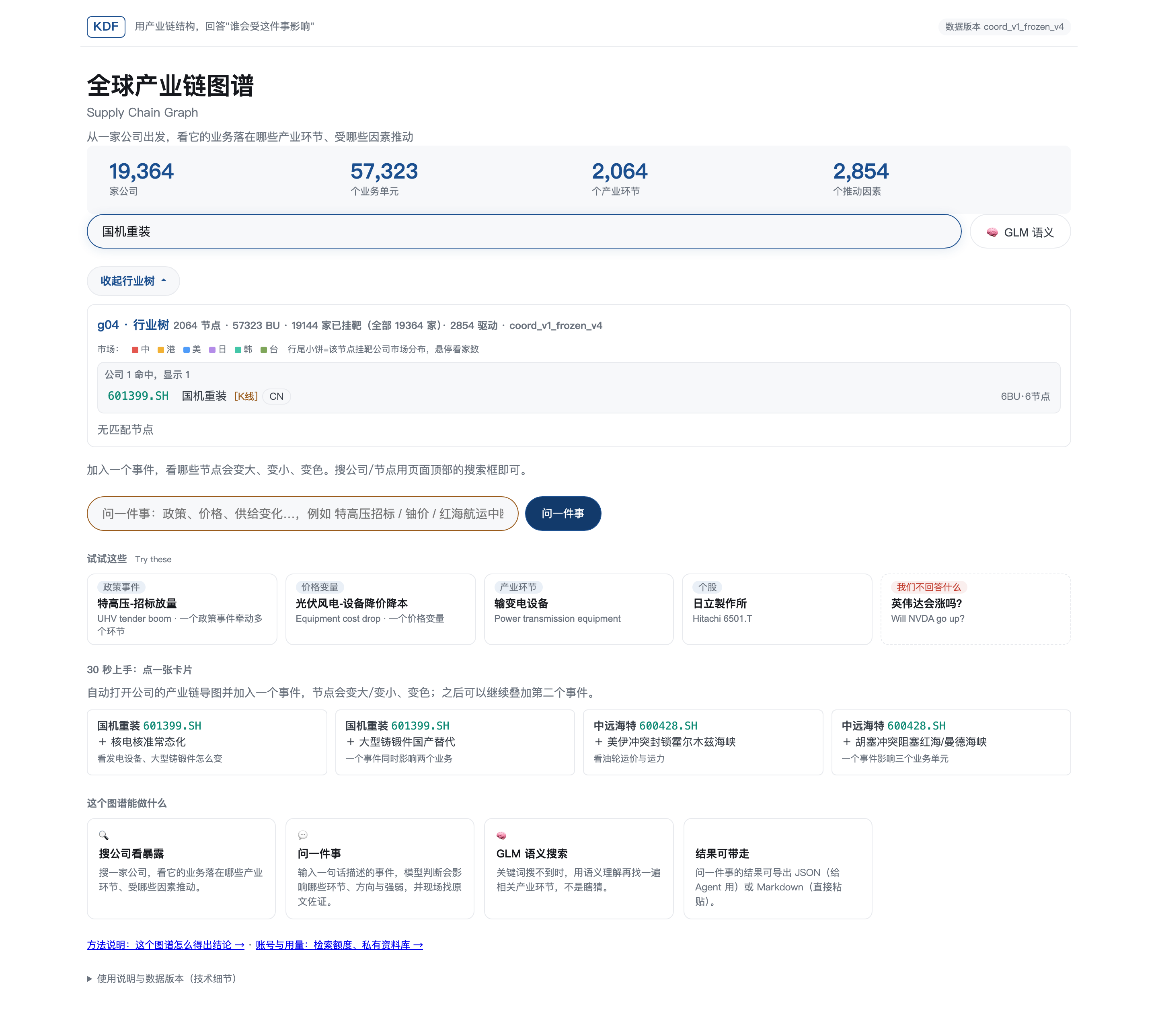
搜索「国机重装」后,左侧行业树立即定位到其业务所在的全部环节 Searching "601399.SH" instantly highlights all industry nodes its businesses belong to
把一个事件,叠加到公司的产业链结构图上 Overlay a real-world event onto the company's industry chain graph
点击一张公司的产业链思维导图,加入一个事件(政策、价格、供给变化),受影响的节点会立刻变大、变色——红色利好、绿色利空、黄色方向不明;节点大小对应影响强度(显著 > 轻度 > 仅高亮);外圈线型对应时滞(实线=当季,短虚线=1~3 季,点线=一年以上)。多个事件可以继续叠加,净方向与净档位自动重新计算。 Open a company's industry mindmap and add an event (policy, price, or supply shift) — affected nodes instantly resize and change color: red for positive, green for negative, yellow for unclear direction. Node size maps to impact strength (strong > mild > highlight-only); the outer ring style maps to time lag (solid = this quarter, short dash = 1–3 quarters, dotted = 1+ year). Multiple events can be stacked, with net direction and grade recalculated automatically.
本演示中每家公司的产业链拆分颗粒度,是为适配演示展示效果而选取的相对细分层级;实际交付时可以根据客户需求做到更精细的颗粒度拆分。 The granularity of each company's industry chain breakdown shown here was chosen to suit demo presentation; actual delivery can be tailored to a much finer granularity per client requirements.
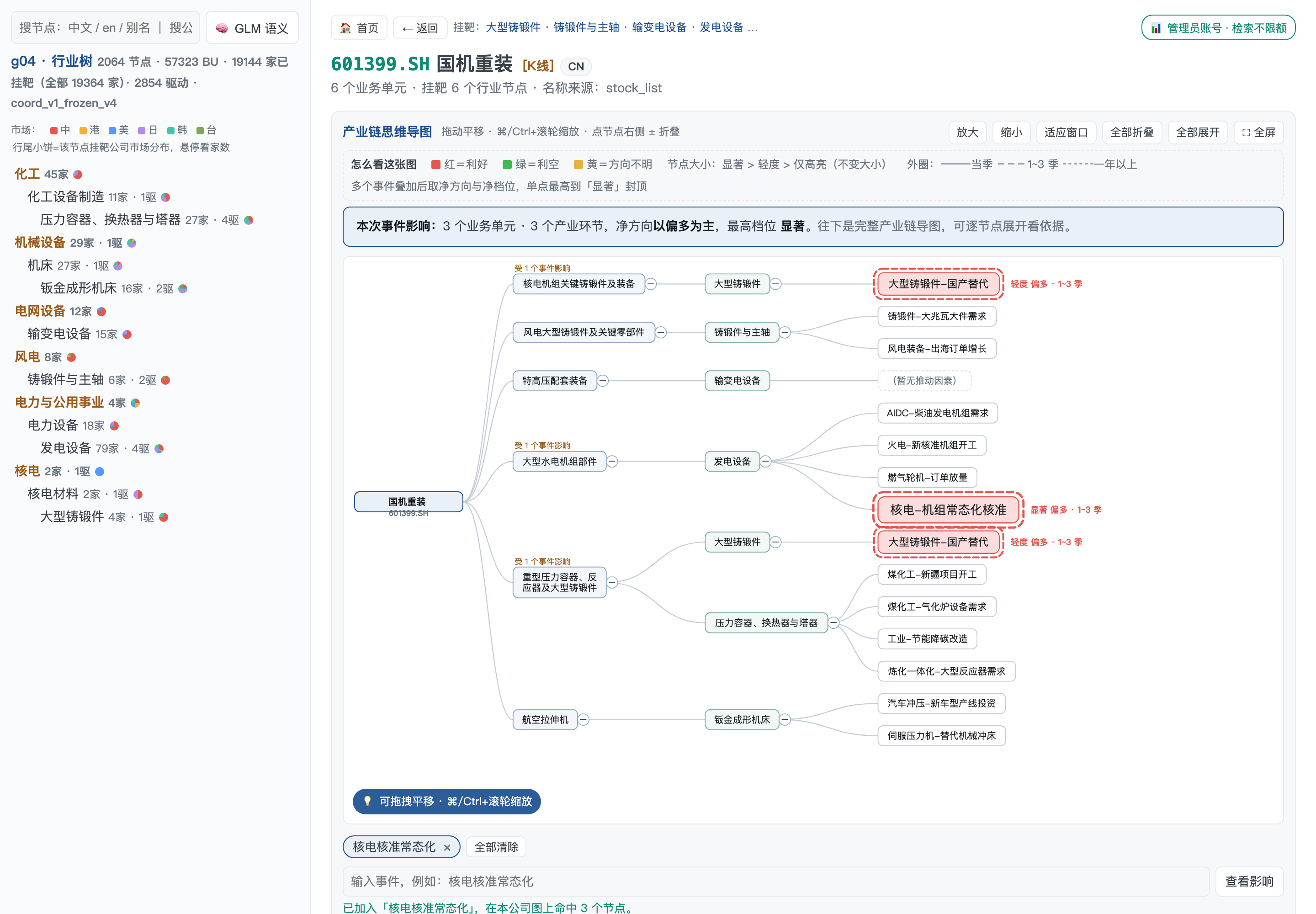
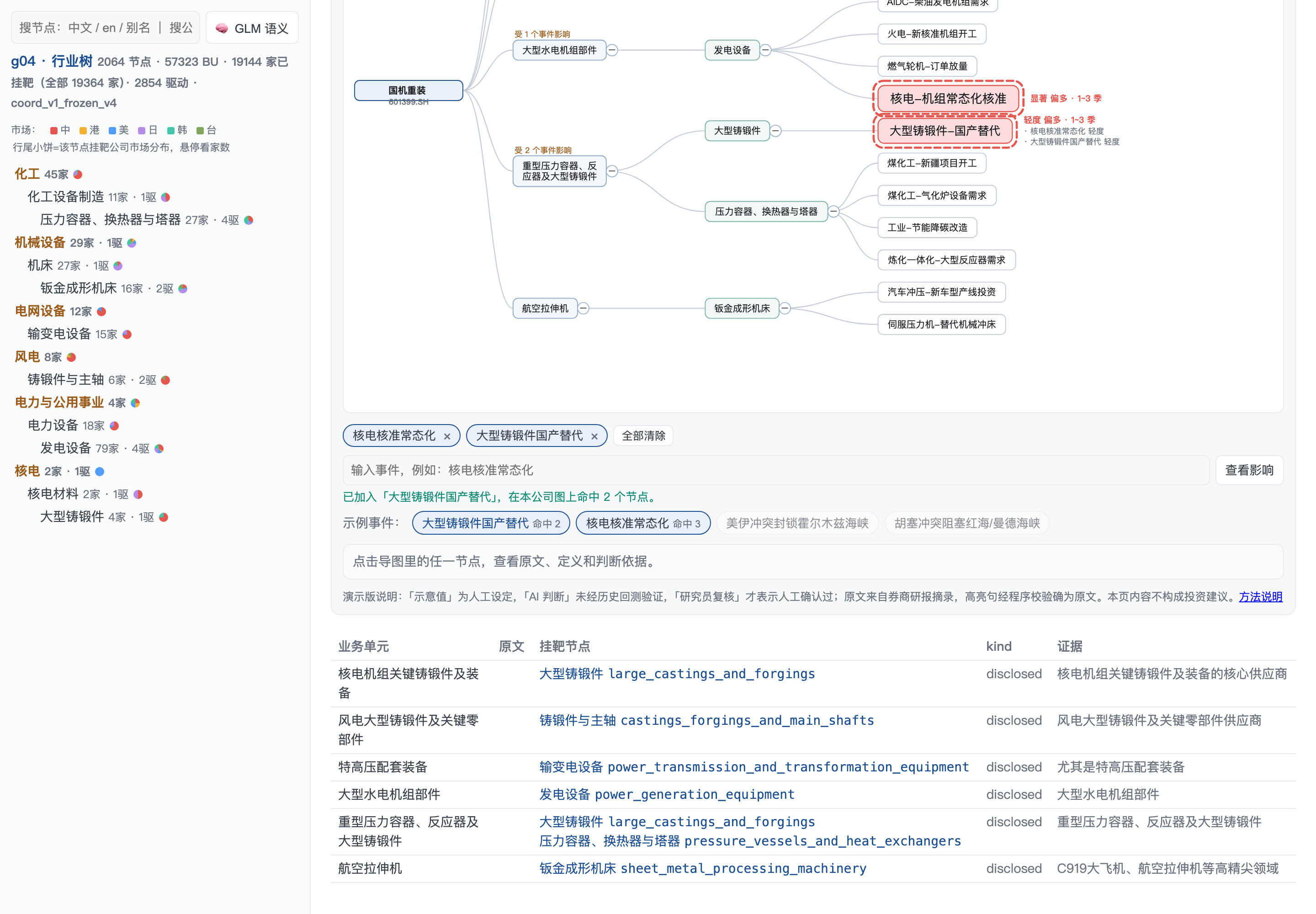
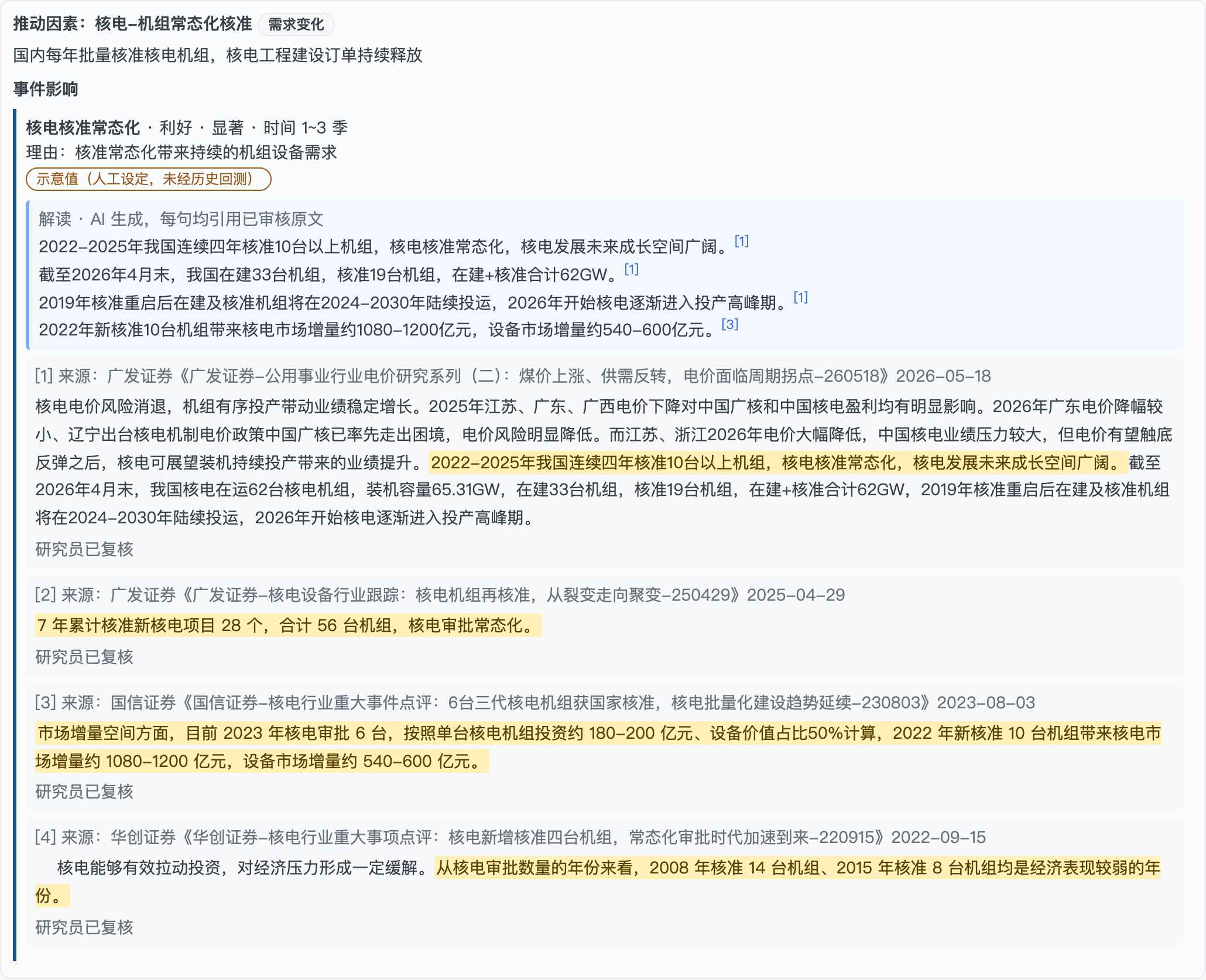
每一条判断都标注来源档位:「研究员已复核」「模型已复核(未经人工确认)」「人工复核待完成」三档并存,不混为一谈;高亮句经程序校验确实原样出现在所附原文中,杜绝模型凭空编造出处。 Every judgment is labeled by provenance tier — "reviewed by analyst", "model-reviewed (unconfirmed)", or "pending human review" — never conflated. Highlighted sentences are programmatically verified to appear verbatim in the cited source, preventing fabricated citations.
检索会越用越快、越用越省:新数据(指第一次被查询、且不在任何已覆盖 API 接口范围内的数据)在首次查询后会自动缓存入库;下次同一环节/因素再被提及时,直接从库中命中已有结果,不必重新检索——大幅节省查询时间与 token 成本。 The more you use it, the faster and cheaper it gets: new data (queried for the first time and not already covered by any connected API) is automatically cached after its first lookup. The next time the same node or driver is mentioned, it's served directly from cache instead of re-querying — saving significant time and token cost.
问一件事,顺着产业链铺到具体公司 "Ask an event" — propagated down to specific companies
不需要先知道哪家公司,直接输入一句话描述的事件(政策、价格、供给变化),系统按三步流程给出答案:① 在因素库里做关键词匹配,② 检索原文佐证,③ 判断方向 / 强度 / 时效。匹配到的推动因素会继续往下铺到具体公司的具体业务单元,并列出各家公司的原始披露文字。 No need to know the company in advance — just describe an event in one sentence. The system follows three steps: ① keyword-match against the driver library, ② retrieve supporting source text, ③ judge direction / strength / timing. Matched drivers then cascade down to specific companies' business units, each with its own original disclosure text listed.
- ✓三步流程全程透明,不是"算命"Transparent 3-step process, not a black-box guess
- ✓每条结论配原文佐证与出处Every conclusion paired with source text and citation
- ✓按市场分组展示命中的公司列表Matched companies grouped by market
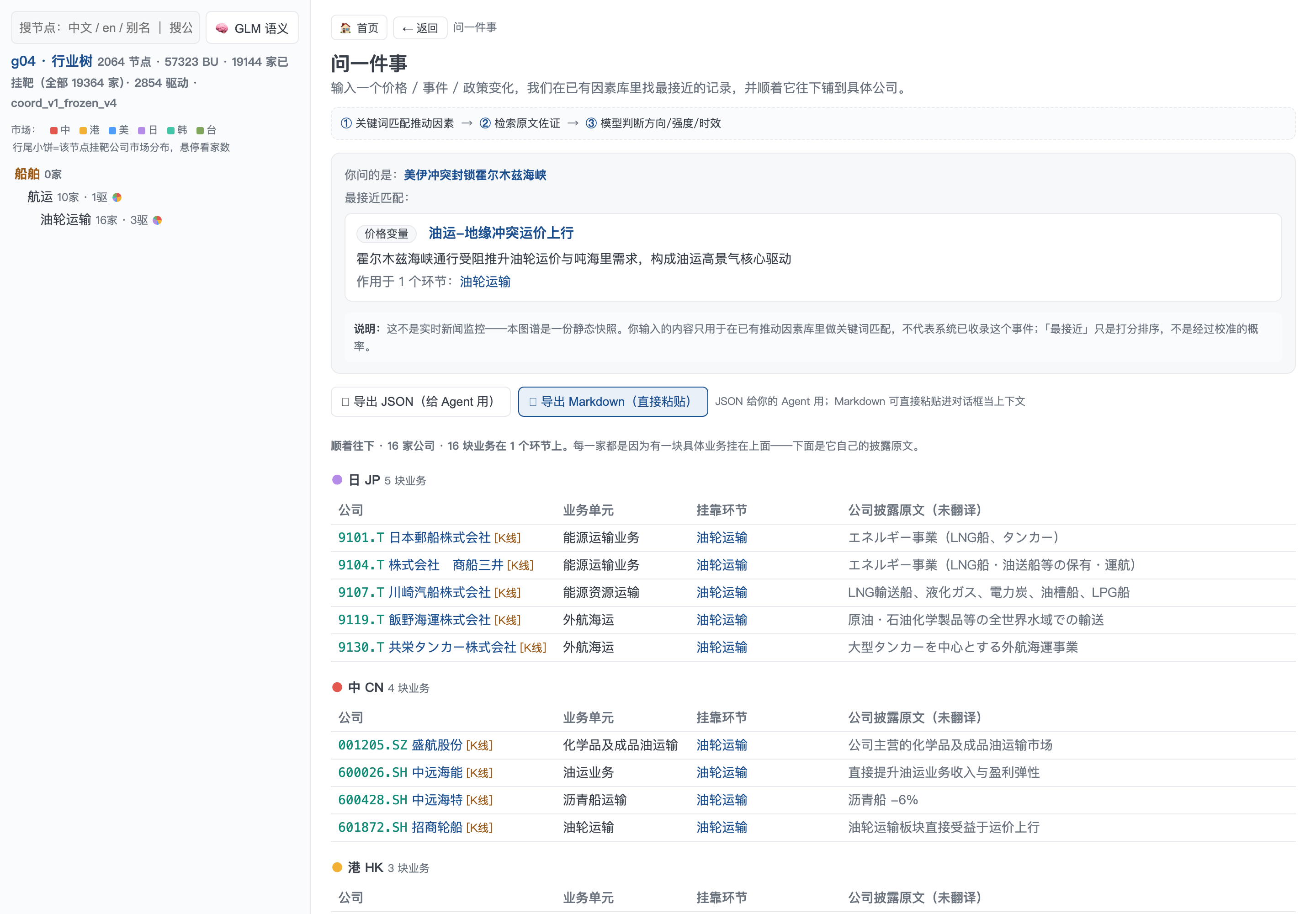
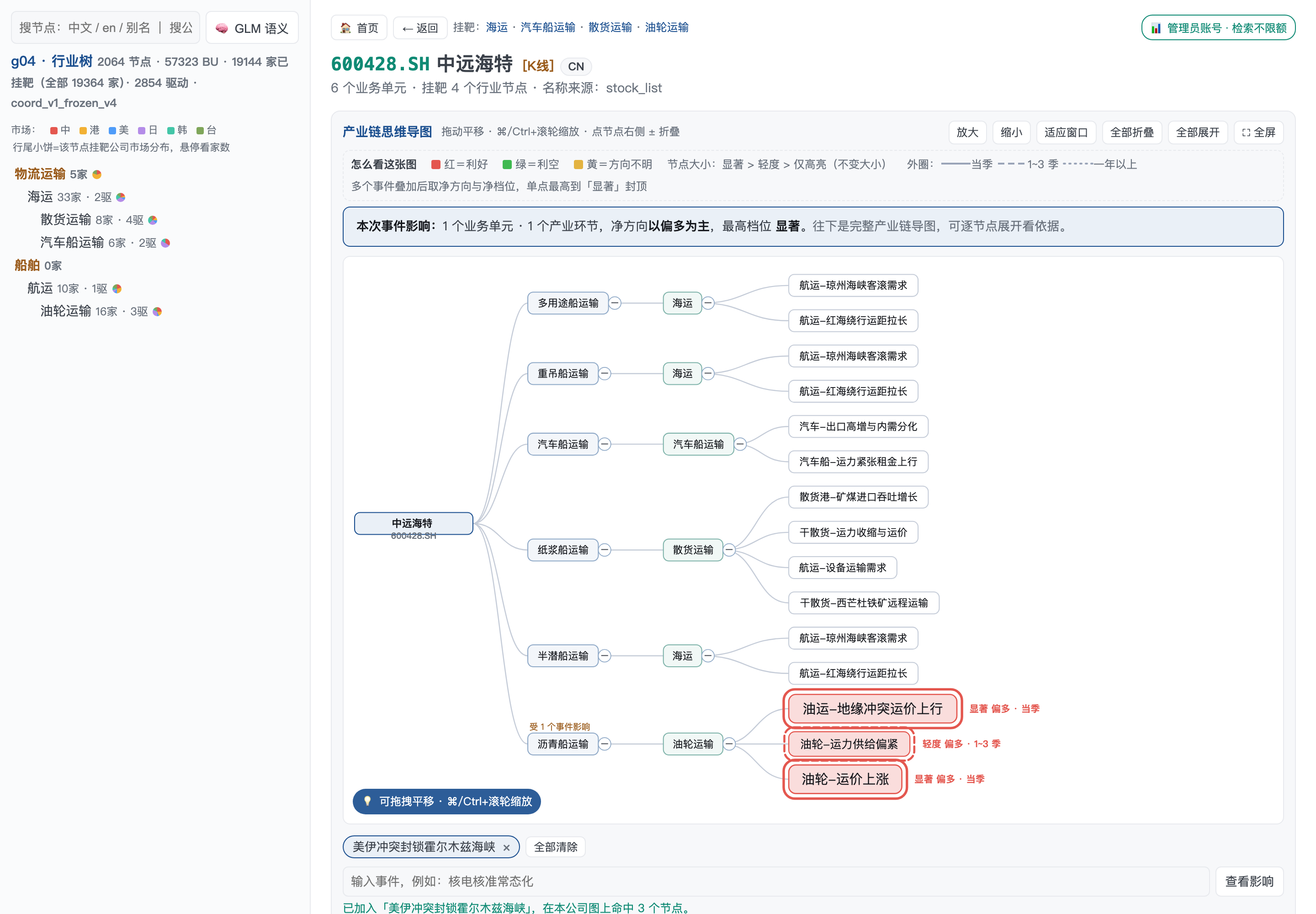
输入「美伊冲突封锁霍尔木兹海峡」→ 匹配到「油运-地缘冲突运价上行」驱动因素 → 命中 16 家油轮运输公司 Input "Strait of Hormuz blockade" → matched to "tanker rate surge" driver → hits 16 tanker shipping companies
关键词搜不到?用 GLM 语义理解再找一遍 Keyword search came up empty? Let GLM understand the intent
输入一句自然语言描述(比如"船舶拆解价格上涨对哪些行业有利"),接入 glm-5.2 对全部行业节点目录做语义匹配,理解背后的产业逻辑并给出相关产业环节和理由,而不是简单的字符串匹配——不是瞎猜,是有模型做语义判断。 Type a natural-language question (e.g. "which industries benefit from rising ship-breaking prices"). glm-5.2 performs semantic matching across the full industry node catalog, understands the underlying industrial logic, and returns relevant nodes with reasons — not simple string matching, but model-grounded semantic judgment.
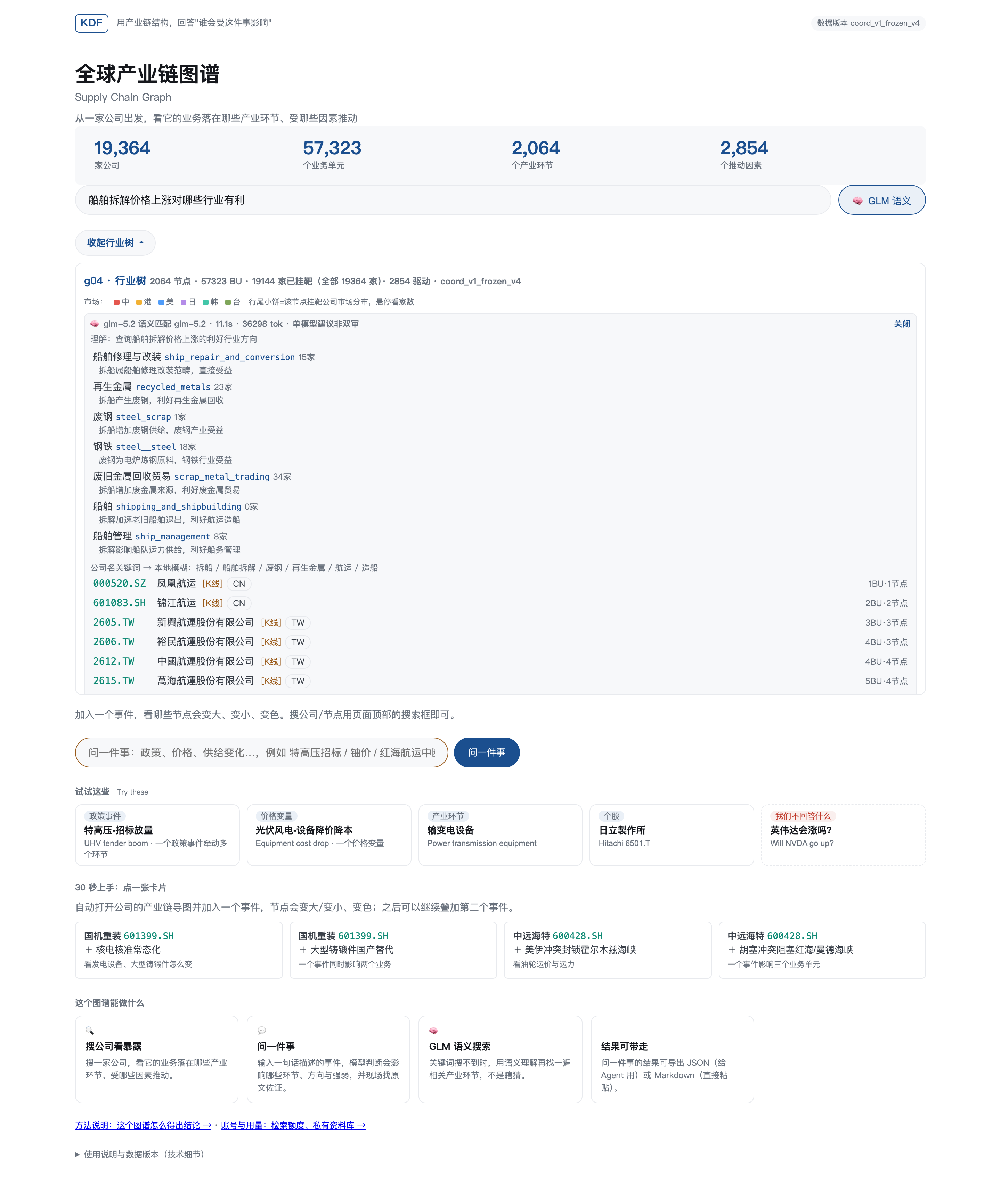
理解后匹配到「船舶修理与改装」「再生金属」「废钢」等 7 个相关环节,并给出匹配理由 Matched to 7 related nodes — "ship repair & conversion", "recycled metals", "steel scrap" — each with a reason
这些结论是怎么得出来的 How are these conclusions derived
一句话:先把"一个事件会推动哪些因素、往哪个方向、多强、多久见效"列出来,再逐条附上能回查的原文。每一条结论都标明是谁判断的。 In one sentence: we first determine which drivers an event affects, in which direction, how strongly, and over what time horizon — then attach traceable source text to every item. Each conclusion is labeled with who made the judgment.
对每个推动因素逐条判断:是否受影响、方向、强弱(强/中/弱)、多久见效(当季/1~3季/一年以上),映射为节点大小、颜色与外圈线型。For each driver: is it affected, in which direction, how strong (strong/medium/weak), how soon (this quarter / 1–3 quarters / 1+ year) — mapped to node size, color and ring style.
「示意值」=人工设定演示数字;「AI 判断」=模型给出、未经历史回测;「研究员复核」=有人逐条看过并署名,只有这一档表示人工确认过。"Illustrative" = manually set demo figure; "AI judgment" = model-generated, not backtested; "Analyst-reviewed" = reviewed and signed off by a person — the only tier that means human-confirmed.
原文取自券商研报和新闻原文摘录;高亮句程序校验确实原样出现在附带原文中,对不上就不展示,杜绝模型凭空编造出处。Sources are excerpts from brokerage reports and news. Highlighted sentences are programmatically verified to appear verbatim in the attached source; mismatches are never shown — no fabricated citations.
局限:强弱和时滞是模型加原文逻辑的判断,还没有用历史事件做回测,不能当作统计结论;本图谱不预测价格、不给评级、不做买卖推荐;原文来自研报摘录,不等于公司官方披露。本页内容不构成投资建议。 Limitations: strength and lag are model judgments grounded in source text, not backtested against historical events — not a statistical conclusion. This graph does not predict prices, issue ratings, or give buy/sell recommendations. Source text comes from brokerage report excerpts, not official company disclosures. Nothing on this page constitutes investment advice.
本页全部截图来自真实运行的工作台,不是设计稿,但本页本身是静态的、不可交互的——你现在看到的是我们提前操作好并截图保存的结果。真实产品支持你现场实时搜索任意公司、输入任意事件、叠加任意组合,并在几秒到一分钟内拿到带原文依据的判断。如果这些能力对你有用,欢迎预约一次真实功能的现场演示。 Every screenshot here is from the real, running workbench — not a mockup. But this page itself is static and non-interactive: what you see are results we captured in advance. The real product lets you search any company, describe any event, and stack any combination live — getting a cited judgment back within seconds to a minute. If this is useful to you, we'd welcome booking a live demo of the real product.
想看真实功能的现场演示? Want to see the real product live?
欢迎联系我们预约一次实时演示 Get in touch to schedule a live walkthrough